Admin overview
This guide is for people who run a Hephaestus deployment. It has five parts:
- Deploy installs the supported stack.
- Configure connects providers, AI models, and practices.
- Operate covers upgrades, backups, troubleshooting, and incidents.
- Security and compliance covers the threat model, keys, release verification, legal pages, and data protection.
- Reference lists every setting, the server runtime, network egress, sizing, and what a version number promises.
Developers who use Hephaestus need the User guide. People who change the code need the Contributor guide.
Choose an install path
Each path installs the same signed Helm chart with a different profile. After the install, each path continues at First steps § 3. Sign in.
| Where you install | Install page | Profile |
|---|---|---|
| One Linux host. The installer sets up k3s and the platform for you. | Install on one host | small.yaml. The installer selects it. |
| A cluster on which you are a cluster-admin | Install on a Kubernetes cluster | small.yaml for one node. dev.yaml for a trial without reviews. |
| A cluster on which you are not a cluster-admin, or a cluster of several nodes | Install on a managed cluster without cluster-admin | cluster.yaml |
Profiles gives the size and the use of each profile.
What a deployment consists of
This view shows who uses Hephaestus and which services it connects to.
Each grey dashed box marked «external» is a service that you connect.
Each arrow points from the side that starts the exchange. GitHub, GitLab and Slack start some exchanges too: they send work events and questions.
An admin is a workspace admin or an instance admin, as Two kinds of admin explains.
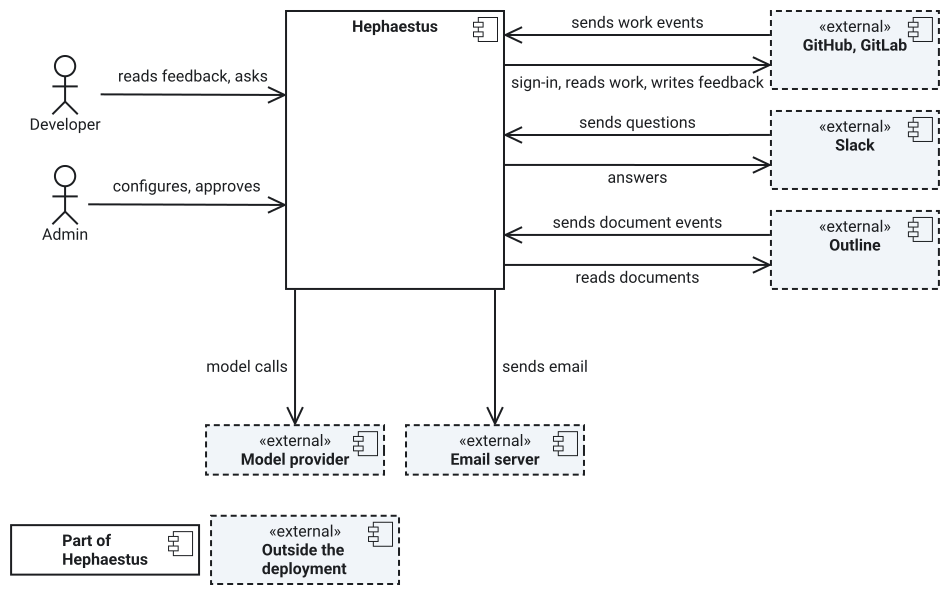
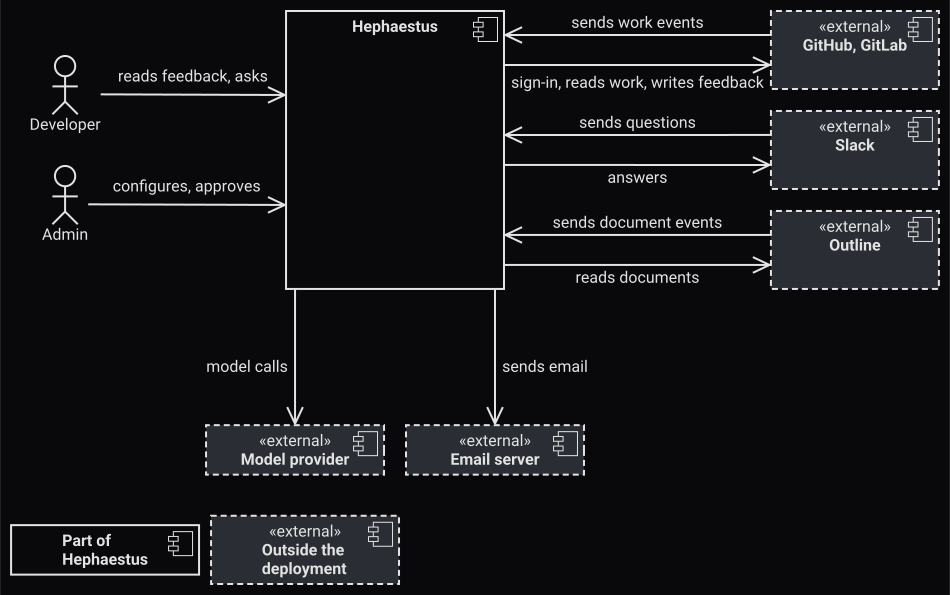
Connections as text
| From | To | What happens |
|---|---|---|
| Developer | Hephaestus | Reads feedback and asks questions |
| Admin | Hephaestus | Configures Hephaestus and approves feedback |
| GitHub, GitLab | Hephaestus | Send work events |
| Hephaestus | GitHub, GitLab | Signs people in, reads work and writes feedback |
| Slack | Hephaestus | Sends questions |
| Hephaestus | Slack | Answers |
| Outline | Hephaestus | Sends document events |
| Hephaestus | Outline | Reads documents |
| Hephaestus | Model provider | Model calls |
| Hephaestus | Email server | Sends email |
GitHub or GitLab is required: it supplies the work and the sign-in. Slack, Outline and email are optional. A model provider is required for reviews and conversations. Only Hephaestus holds its key.
One application image runs the server. PostgreSQL stores the data of the deployment, including the provider events that wait for processing. A Gateway API controller in front of the release handles TLS. The server starts a sandboxed container in a separate namespace for each practice review. It does not keep that container between reviews. What the chart runs shows each Pod, its storage and its network policies.
Two kinds of admin
- Instance admin — operates the whole deployment. This includes AI providers, instance-wide settings, and the practice catalog that workspaces can adopt from.
- Workspace admin — configures one workspace. This includes its repositories, practices, members, AI model, and cap on AI spend.
A person can be both. Instance administration covers the operator console. Integrations covers workspace connections.
Set it up in this order
- Install Hephaestus on the path that fits your platform. Then follow First steps for the login provider, the first admin, and the first review.
- Connect a source: a GitHub App or GitLab connection that supplies repository activity. Integration settings covers Slack and Outline.
- Connect an AI provider with a supported API.
- Set a cap on AI spend for each workspace.
- Choose practices for the instance to include and the workspace to adopt. Practice review explains how a review runs. Scan a repository reviews a default branch and exports SARIF.
- Publish the legal pages with imprint and privacy information for your deployment. The data-protection documentation has the GDPR records.
Keep it running
- Upgrade owns the upgrade procedure, failed-migration recovery, and rollback. Before an upgrade, read the compatibility policy and the migration guide.
- Backup & restore covers recovery.
- Troubleshooting lists common failures and their fixes.
- Sizing and scaling gives the resource budget.
- The production operations runbook covers incident brakes, silent deployment, PostgreSQL restore, and removal of external feedback.
- Practice review operations and webhook ingestion operations cover the two pipelines whose failures are most visible.