Helm chart reference
This page describes the Helm chart of a release: the clusters it supports, the objects it runs, its profiles, and its values. Install on a Kubernetes cluster, Install on one host and Install on a managed cluster give the procedures. The chart is the only supported deployment (compatibility policy).
Each release publishes the chart as a signed OCI artifact, oci://ghcr.io/hephaestus-build/charts/hephaestus.
The chart source is in deploy/chart/hephaestus/ of the repository.
It uses only stable Kubernetes APIs and the Gateway API HTTPRoute resource of version v1.
Supported clusters
The chart needs a cluster with these items:
- A conformant Kubernetes cluster at a minor version that the Kubernetes project supports when the Hephaestus release ships. The chart refuses a cluster below 1.35. ADR 0060 gives the reason.
- A network plugin that enforces NetworkPolicy for egress and for ingress, also on traffic to a Service address.
- A Gateway API controller for
HTTPRoutev1with the two features in Gateway routes. - A storage class for
ReadWriteOncevolumes, for the bundled PostgreSQL. - With
sandbox.enabled, the agent-sandbox controller and its extensions at the version that the release pins, and the sandbox prerequisites.
When a Kubernetes minor version reaches its end of life upstream, the next Hephaestus release can drop it.
Clocks
Keep the clock of every host that runs the server or PostgreSQL synchronized by NTP. Conversation turn leases and person erasure compare times that different hosts write.
What the chart runs
| Component | Kind | What it runs |
|---|---|---|
server | Deployment, 2 replicas by default | The server: the API, the provider webhook receiver, sync, delivery, and with sandbox.enabled the sandboxes and their gateway. server.replicas: 0 stops it for maintenance. |
migration | Job, one for each Helm revision | The server image in its migrate run mode. It applies the database migrations of the release and exits. |
webapp | Deployment | The SPA, from the non-root webapp image. |
postgresql | StatefulSet, with postgresql.bundled | The release PostgreSQL image, with pg_partman and pgBackRest. |
postgresql-backup | CronJobs, with postgresql.backup.enabled | Full and differential pgBackRest backups (Back up the database). |
postgresql-exporter | Deployment, with postgresql.metrics.enabled | The PostgreSQL metrics exporter (Database metrics). |
route | HTTPRoute | /, /api and /webhooks (Gateway routes). |
agent-image | DaemonSet, with sandbox.enabled | Keeps the agent image on each sandbox node (The agent image on the sandbox nodes). |
| Sandbox templates | SandboxTemplates, SandboxWarmPools, quotas and policies, with sandbox.enabled | The sandbox namespace objects (Sandboxes). |
agent-sandbox-controller | Deployment, with sandbox.controller.enabled | The agent-sandbox controller in the release namespace, for a managed cluster. |
priority | PriorityClasses, cluster-wide, with priorityClasses.create | The priorities of the Pods (Priorities). |
The PriorityClasses are the only cluster-wide objects of the chart.
Their names contain the namespace and the name of the release, so two releases never share one.
Without permission to create them, set priorityClasses.create: false and name classes that exist (Priorities).
The migration Job is the only migration owner. Each new server Pod waits for the schema before it starts, for up to 10 minutes, while the previous release serves. The Job is a plain part of the release and not a Helm hook, because a hook would run before the bundled PostgreSQL exists. Database migrations describes the run mode and the wait.
The server uses RollingUpdate with maxSurge: 1 and maxUnavailable: 0.
A replacement must be ready before an old Pod stops serving.
The server PodDisruptionBudget keeps at least one server available (minAvailable: 1).
With one replica, it prevents voluntary eviction.
Schema-compatible releases serve together during an update. An incompatible schema needs a stopped schema upgrade. Graceful drain describes how a server stops.
Where each part runs on a managed cluster
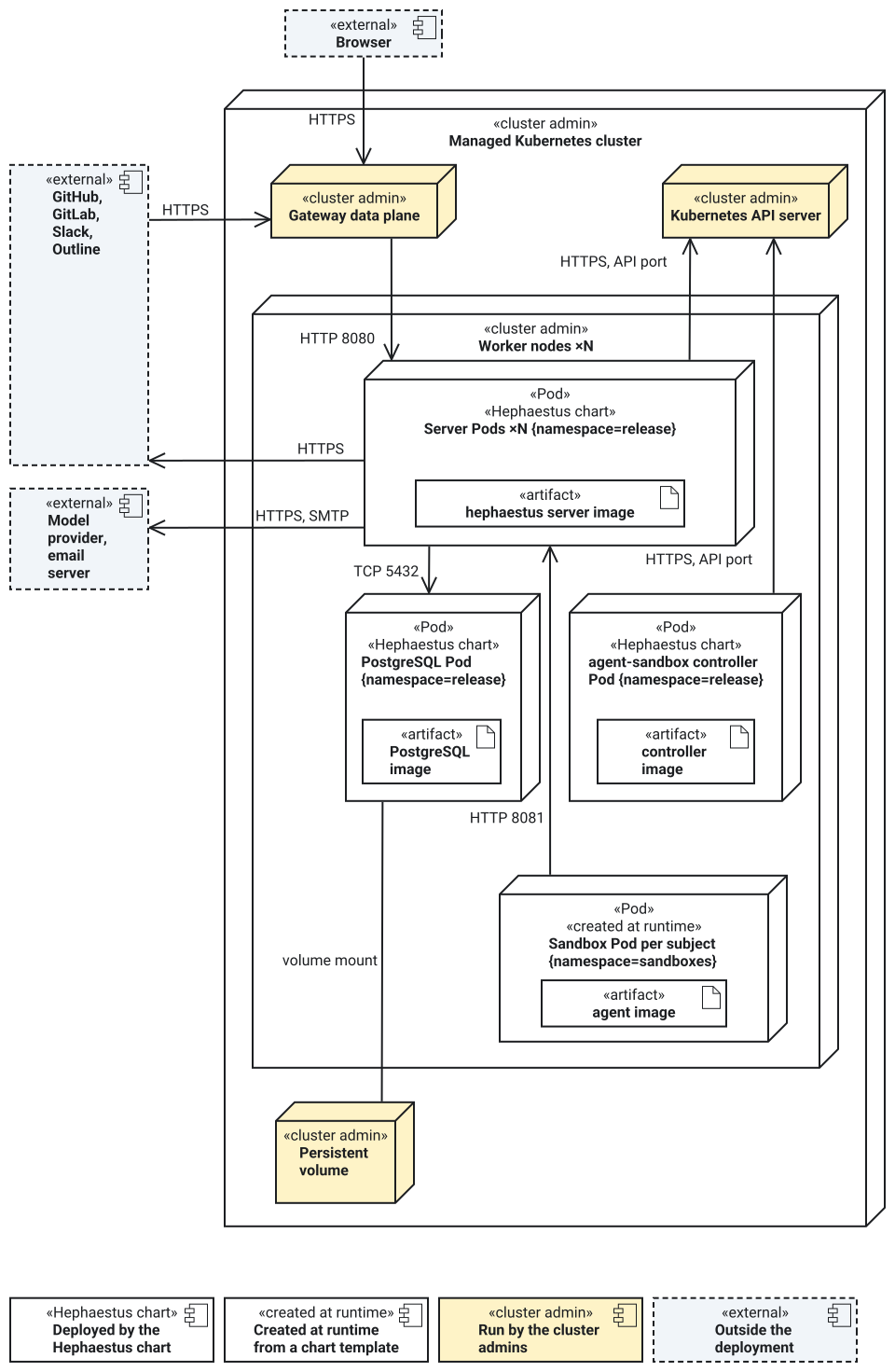
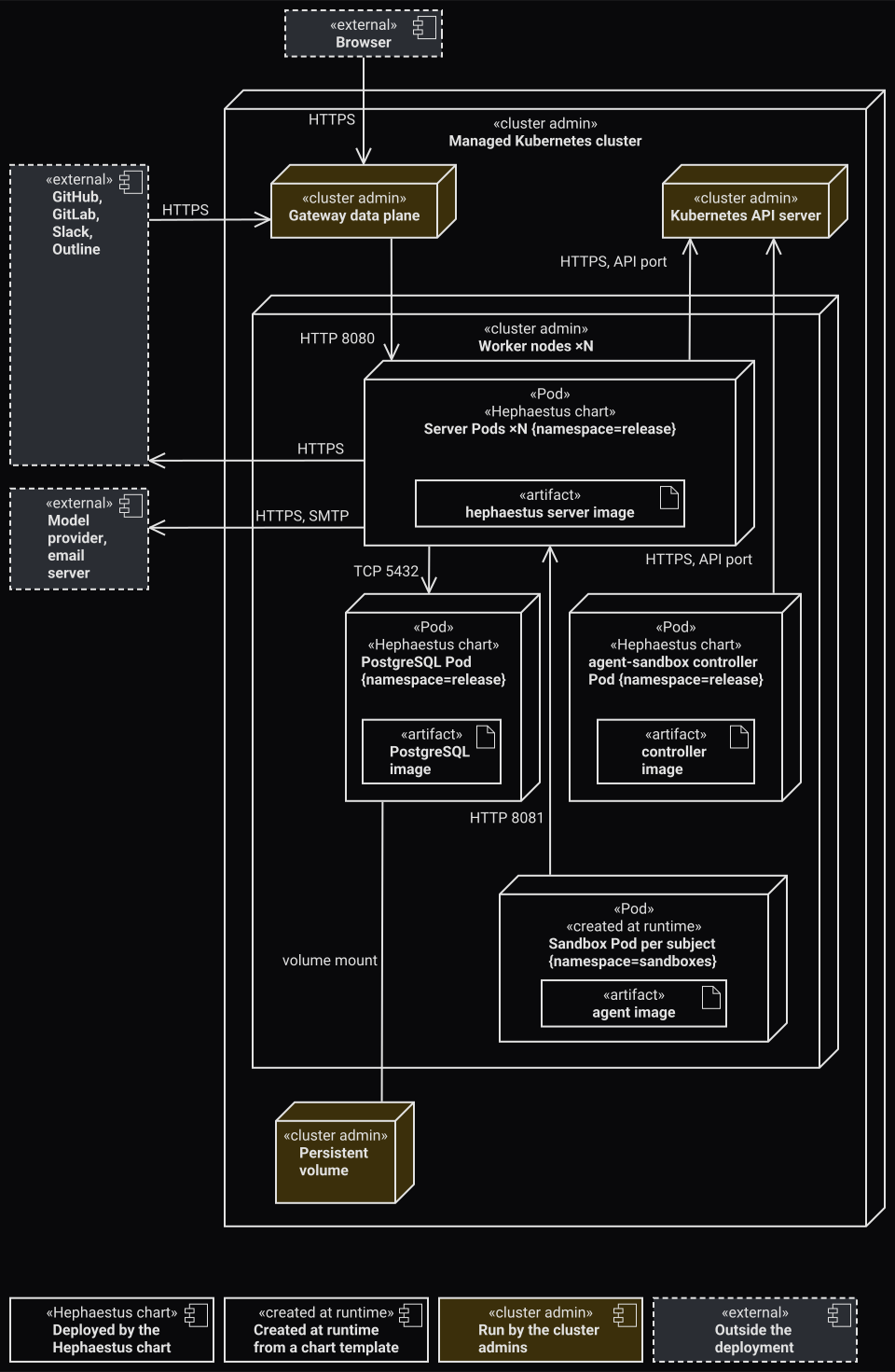
This UML deployment view shows where each part of Hephaestus runs on a managed cluster, and who deploys and runs it.
It shows the managed-cluster profile (profiles/cluster.yaml), with the bundled PostgreSQL and with sandboxes on.
Each Pod is an execution environment with the image that it runs. Its namespace is in braces. The chart does not pin a Pod to a node, so the view shows the worker nodes as one group.
Each arrow is a network connection, labelled with its protocol and port. It points from the side that opens the connection. Each box names who deploys and runs it:
«Hephaestus chart»: the chart that you install deploys it in your two namespaces, and you run it.«created at runtime»: the agent-sandbox controller creates it from a template that the chart deploys.«cluster admin»: the cluster admins run it.«external»: a service outside the cluster.
The server and the agent-sandbox controller never connect to each other: both connect to the Kubernetes API server.
The server creates a SandboxClaim there, and the controller watches the claims and creates each sandbox Pod.
Public traffic goes through the Gateway data plane, the proxy or load balancer of the cluster admins' Gateway API implementation. It reaches the server Service on port 8080.
Connections as text
| From | To | Protocol | What crosses |
|---|---|---|---|
| Browser | Gateway data plane | HTTPS | The SPA and the API |
| GitHub, GitLab, Slack, Outline | Gateway data plane | HTTPS | Webhooks |
| Gateway data plane | Server Pods | HTTP, port 8080 | The SPA, the API and the webhooks, after TLS ends at the Gateway |
| Server Pods | GitHub, GitLab, Slack, Outline | HTTPS | Provider reads and writes |
| Server Pods | Model provider, email server | HTTPS, SMTP | Model calls, email |
| Server Pods | Kubernetes API server | HTTPS, the API server port | SandboxClaim writes, with the server's ServiceAccount |
| agent-sandbox controller Pod | Kubernetes API server | HTTPS, the API server port | Watches the claims and creates the sandbox Pods, with the controller's ServiceAccount |
| Server Pods | PostgreSQL Pod | TCP, port 5432 | SQL, with the database login |
| PostgreSQL Pod | Persistent volume | Volume mount | The database files |
| Sandbox Pod | Server Pods | HTTP, port 8081 | The sandbox gateway, with the sandbox token |
These facts complete the view:
- You need access to the two namespaces only. The cluster admins apply the admin bundle: the CRDs, the PriorityClasses and the read-only ClusterRole of the controller. The chart renders no cluster-wide object.
- The chart sets no rule that spreads the server replicas over nodes, so the cluster's scheduler places them.
- PostgreSQL stores its data on a persistent volume from the cluster's storage class. You run an external PostgreSQL outside the chart.
- A network policy lets a sandbox reach only port 8081 of the server. The public route has no rule for that port.
- The egress policies allow the Kubernetes API only at
networkPolicy.kubernetesApi.cidrand.port: the endpoint after address translation, not the Service port. - The nodes that run sandboxes need the agent image before the first claim.
The view shows one decided change that the chart does not have yet: the server serves the SPA (ADR 0100).
Until that change lands, the webapp Deployment serves the SPA with nginx.
Sync-status hints use PostgreSQL notifications.
The sandbox namespace enforces the restricted Pod Security Standard. The runtime class decides the rest of the isolation (Sandbox prerequisites):
| Runtime | Isolation of a sandbox |
|---|---|
| runc | A user namespace (hostUsers: false) |
| gVisor | The gVisor kernel, without a user namespace |
On one host, the same parts run on one k3s node, and you are also the cluster admin.
Traefik is the Gateway, the agent-sandbox controller runs in agent-sandbox-system, and the chart's PostgreSQL runs in the release namespace (Install on one host).
Profiles
A profile is a values file in profiles/ that sets capacity for one kind of cluster.
All profiles use the same templates.
The release chart contains them in chart-$VERSION/hephaestus/profiles/ after you verify the release chart.
Give the profile as the first -f file, before your own values.
| Profile | Cluster | Sandboxes | PriorityClasses and agent-sandbox controller |
|---|---|---|---|
dev.yaml | A disposable cluster on one workstation, such as k3d or kind | Off: no practice reviews and no conversation turns | The chart creates the classes. No controller is needed. |
preview.yaml | A short-lived preview of one pull request | Off | The chart creates the classes. No controller is needed. |
small.yaml | One node of 4 vCPU, at least 16 GiB of memory and 150 GiB of disk, such as the one-host platform | On | The chart creates the classes. The cluster runs the controller of k3s-agent-sandbox.yaml. |
cluster.yaml | A cluster of several nodes | On | The admin bundle creates the classes. The controller runs in the release namespace. |
With dev.yaml or preview.yaml, the sandbox prerequisites do not apply.
Use dev.yaml to try Hephaestus on a workstation cluster.
No profile is only for a cluster of several nodes on which you are cluster-admin.
Use cluster.yaml, and do the steps of Admin handoff yourself.
Do not also apply k3s-agent-sandbox.yaml: a second agent-sandbox controller would also act on the sandboxes of the release.
Sizing and scaling gives the nodes, requests, reviews and conversation turns of each profile. If a change of profile changes a volume size, read Change a volume size before you upgrade.
Sandbox capacity budget
sandbox.budget.cpu and sandbox.budget.memory state the allocatable CPU and memory of the sandbox node pool that this release can use.
Use the capacity that is left after the kubelet reservations, the eviction floor and the workloads outside this release.
These are aggregate limits. They do not prove that each Pod fits an eligible node.
On each additional sandbox node, also reserve one image-hold Pod of the agent-image DaemonSet.
sandbox.conversationTurns sets the conversation turns that the whole installation runs at once:
autocomputes the count from the budget. Both budget values are then required. Without one, the chart fails with a message that links this section.- A number sets the count. With a budget, the chart checks the count against it and fails when the count does not fit. The chart never overcommits.
0stops new turns.
The chart passes the resolved count to each server.
More servers do not add turns.
The small profile uses auto and declares 3500m CPU and 14196Mi memory: the allocatable capacity of a 16 GiB node, rounded down.
The cluster profile declares no budget and uses the default count, 8.
For CPU and memory separately, the chart computes:
steady slots  = floor((budget - resident requests - one backup - review requests) / conversation Pod request)
upgrade slots = floor((budget - resident requests - draining servers and rollout surge - migration/stanza Jobs - one backup) / conversation Pod request)
auto turns    = min(steady CPU slots, steady memory slots, upgrade CPU slots, upgrade memory slots)
- Resident requests are the requests of the server, the webapp, PostgreSQL with its backup sidecar, and the controller. The monitoring workloads and one image-hold Pod also count. So does the largest init container of each Pod.
- The review requests are the reviews at once times the review template request, with the RuntimeClass overhead. The reviews at once are
sandbox.reviewMemorydivided by one review's memory request and overhead. - Each turn needs one conversation template Pod, with its RuntimeClass overhead.
- Requests round up to millicores and MiB. Budget values round down.
The upgrade phase assumes that reviews finish before its peak, and that warm conversation sandboxes stay.
Every old server can still drain when every replacement is ready, so the budgets reserve twice server.replicas for servers.
Sandbox capacity during upgrade gives the operating rule.
A changed request or an added sidecar also changes the turn count.
Values
The schema refuses an unknown key, an image tag, and a value outside its bounds.
Each object name is <release>-<component>, with at most 52 characters.
If a name is longer, the chart keeps its start and adds 8 characters of a hash of the full name.
The app.kubernetes.io/instance label always holds the full release name.
config.auth.assuranceEnforced controls the passkey and recent sign-in checks for administration.
Its default is true, and the chart never changes it from the environment name.
To turn it off, for example on a staging instance, set it to false yourself.
These values set server settings (Integration settings):
| Value | Setting | Default |
|---|---|---|
config.researchOrganization | HEPHAESTUS_RESEARCH_ORGANIZATION | Empty |
config.workspaceCreationPolicy | HEPHAESTUS_WORKSPACE_CREATIONPOLICY: ADMIN_ONLY or SELF_SERVICE (GitHub integration) | ADMIN_ONLY |
config.publicActivity.enabled | HEPHAESTUS_PUBLIC_ACTIVITY_ENABLED | false |
config.publicActivity.repositoryVisibilityMaxAge | HEPHAESTUS_PUBLIC_ACTIVITY_REPOSITORY_VISIBILITY_MAX_AGE | 48h |
config.llmDisplayCurrency | HEPHAESTUS_LLM_DISPLAY_CURRENCY: empty or EUR | Empty |
config.auth.passkeys.instanceAdminRequired | HEPHAESTUS_AUTH_PASSKEYS_INSTANCE_ADMIN_REQUIRED | true |
config.auth.passkeys.workspaceAdminRequired | HEPHAESTUS_AUTH_PASSKEYS_WORKSPACE_ADMIN_REQUIRED | false |
config.auth.passkeys.rpId | HEPHAESTUS_AUTH_PASSKEYS_RP_ID | Empty: the host |
config.auth.passkeys.allowedOrigins | HEPHAESTUS_AUTH_PASSKEYS_ALLOWED_ORIGINS | Empty array: the host |
config.auth.passkeys.adminMaxAge | HEPHAESTUS_AUTH_PASSKEYS_ADMIN_MAX_AGE | 6h |
config.email.tls | starttls sets SPRING_MAIL_PROPERTIES_MAIL_SMTP_STARTTLS_ENABLE and _REQUIRED. implicit sets SPRING_MAIL_PROPERTIES_MAIL_SMTP_SSL_ENABLE. SPRING_MAIL_PROPERTIES_MAIL_SMTP_AUTH is on when config.email.username is set. | starttls |
config.sync.runOnStartup | SYNC_RUN_ON_STARTUP | true |
config.sync.timeframeDays | SYNC_TIMEFRAME_DAYS | 7 |
config.sync.syncCron | SYNC_CRON, a Spring cron expression with six fields | 0 0 * * * * |
config.sync.cooldownMinutes | SYNC_COOLDOWN_MINUTES | 60 |
webapp.securityContact | SECURITY_CONTACT of the webapp. With a value, /.well-known/security.txt names it. | Empty: no file |
config.auth.bootstrapAdmins, config.auth.browserExtensionIds, config.auth.passkeys.allowedOrigins, and config.outline.allowedOrigins take arrays of strings.
Use [] for an empty list.
The chart joins the items in their order. An item cannot contain a comma.
config:
  auth:
    bootstrapAdmins:
      - "github:1234567"
    browserExtensionIds: []
    passkeys:
      allowedOrigins: []
  outline:
    allowedOrigins: []
Integration values
Each integration takes its settings from your values file and its secrets from the Secret.
values.schema.json describes each value.
Integration settings explains each setting.
| Integration | Values | Secret keys |
|---|---|---|
| GitHub login | config.github.oauthClientId | GITHUB_OAUTH_CLIENT_SECRET |
| GitHub App | config.github.appId, config.github.appClientId, config.github.appInstallationUrl | GH_APP_PRIVATE_KEY, GH_APP_CLIENT_SECRET |
| GitLab | config.gitlab.* | GITLAB_OAUTH_CLIENT_SECRET |
| Slack | config.slack.* | HEPHAESTUS_INTEGRATION_SLACK_SIGNING_SECRET, HEPHAESTUS_INTEGRATION_SLACK_CLIENT_SECRET |
| Outline | config.outline.* | OUTLINE_OAUTH_CLIENT_SECRET |
config.email.* | SPRING_MAIL_PASSWORD | |
| Provider webhooks | None | WEBHOOK_SECRET, WEBHOOK_ROUTING_SECRET |
Gateway routes
| Request path | Backend | Path change |
|---|---|---|
/webhooks and below | server | None |
/api and below | server | /api is removed |
| All other paths | webapp | None. The webapp serves the SPA for an unknown path. |
The server serves the API without the /api prefix.
A standard Ingress cannot remove a path prefix, so the chart does not use one.
The Gateway controller must support the core HTTPRoute features and these two extended features:
URLRewritewithReplacePrefixMatch, for/api.ResponseHeaderModifier, forStrict-Transport-Securityon each rule.
The chart cannot detect a controller without them. Confirm both features for your controller.
The live streams of Hephaestus stay open for much longer than one request. The server sends a heartbeat on each live stream about every 20 seconds. Two events can be about 40 seconds apart. Thus, set each idle timeout between the browser and the server to at least 60 seconds.
The /api rule sets timeouts.request and timeouts.backendRequest to 0s, which asks the controller for no time limit.
A controller with the HTTPRouteRequestTimeout and HTTPRouteBackendTimeout features applies them.
The Traefik of the one-host platform does not have these features.
A controller that limits the total time of a response, and does not apply the values, ends each live stream at that limit.
The other two rules set no timeout and no retry.
Network policy
Network policy is always on. No value turns it off. Each pod of the release starts with no ingress and no egress. The chart then opens only these paths:
| From | To | Port |
|---|---|---|
networkPolicy.gateway pods | server, webapp | 8080 |
server | PostgreSQL | 5432, or the external port |
server | networkPolicy.externalEgress | 443 |
server, if config.email.host is set | networkPolicy.externalEgress | config.email.port |
server, with sandbox.enabled | The Kubernetes API, networkPolicy.kubernetesApi | Its port |
server, if networkPolicy.modelGatewayPorts is set | networkPolicy.gateway pods | networkPolicy.modelGatewayPorts |
server, for each item of networkPolicy.modelEndpoints and networkPolicy.scmEndpoints | Its cidr | Its ports |
| Review and conversation sandboxes | server | 8081, the sandbox gateway |
| PostgreSQL and the backup Jobs, with backups on | postgresql.backup.s3, or networkPolicy.externalEgress | postgresql.backup.s3.port |
| The backup Jobs, with backups on | PostgreSQL | 8432, the pgBackRest TLS server |
| All pods | networkPolicy.dns pods | 53 |
networkPolicy.metrics pods | server | 9090, the management port |
networkPolicy.metrics pods | The PostgreSQL exporter | Its metrics port |
server, if config.tracing.otlpEnabled and networkPolicy.traceCollector are set | networkPolicy.traceCollector pods | The port of config.tracing.otlpEndpoint |
Sandboxes are in the sandbox namespace, where every pod also starts with no ingress and no egress.
A model endpoint that this cluster's own Gateway serves resolves to a public address, but the connection ends at a Gateway Pod.
That private address is outside networkPolicy.externalEgress, so the server cannot reach the endpoint.
Set networkPolicy.modelGatewayPorts to the container ports of the Gateway Pods, for example [8443, 8000] for the Traefik of the one-host platform.
networkPolicy.gateway must name the namespace and at least one pod label of the Gateway data plane.
A namespace without labels would admit every pod in it, so the chart refuses it.
The same rule applies to networkPolicy.metrics and networkPolicy.traceCollector when you set their namespace.
No Service and no route expose the management port. Only the kubelet probes and the metrics scraper reach it.
The external egress rule excludes private, link-local, and shared address ranges by default.
An external database in a private range needs postgresql.external.cidr.
A rendered policy does not show enforcement: the sandbox isolation gate tests it on your cluster.
Network policy controls which pods can connect. It does not encrypt traffic. The connections to PostgreSQL use TLS (PostgreSQL TLS Secret). These internal channels send plain text:
- The connections from the Gateway data plane to the server and the webapp, after TLS ends at the Gateway.
- The connections from sandboxes to the sandbox gateway of the server.
On a cluster with several nodes, these channels cross the node network. When that network is not private to the cluster, use a network plugin that encrypts traffic between nodes, for example WireGuard in Calico or Cilium.
Storage and retention
| Data | Bound | Setting |
|---|---|---|
| PostgreSQL | Volume size, 20 GiB by default | postgresql.persistence.size |
| Provider event inbox, in PostgreSQL | 3 days for handled events, 30 days for dead letters | HEPHAESTUS_INTEGRATION_CONSUMER_REPLAY_WINDOW, HEPHAESTUS_INTEGRATION_CONSUMER_DEAD_RETENTION |
| Server Git mirrors and review clones | emptyDir size limit on the node, for each server | server.gitCache.sizeLimit |
| AI spend ledger | Retention | config.llmUsageRetention |
| Conversations, feedback and practice results | Retention | config.feedbackRetention |
| Temporary files | emptyDir size limit | Fixed in the templates |
Webhook ingestion operations gives the durability guarantee of the inbox.
The Git mirrors are a cache. A restarted server clones them again, so they use node storage and no volume claim. The node needs that much free ephemeral storage, and the container limits include it. The same volume holds review checkouts and the archives that wait for their sandbox.
Above 80 percent of server.gitCache.sizeLimit, the server deletes the mirrors that it used least recently. Each deleted mirror costs a full fetch at its next capture.
Review checkouts that fill the volume alone still make the kubelet evict the Pod. HephaestusGitCacheNearlyFull warns first.
Pod security
Each pod meets the Kubernetes Restricted Pod Security Standard:
- A non-root user,
RuntimeDefaultseccomp, and no privilege escalation. - All capabilities dropped and a read-only root filesystem.
- No host path, host network, or container runtime socket.
- No service account token, except on the server with
sandbox.enabled, the agent-sandbox controller, and the VictoriaMetrics Pod of the monitoring stack. The server's Role reaches only the sandbox namespace.
The webapp runs as user and group 101 and listens on port 8080.
Its only writable path is a 16 MiB volume at /tmp/hephaestus-webapp.
The bundled PostgreSQL runs as the image user 999 and owns its volume through fsGroup.
The volume is at /var/lib/postgresql (ADR 0038).
The image keeps its versioned data directory below it, and the chart does not set PGDATA.
PostgreSQL starts with ssl=on and the certificate and key from the TLS Secret, read-only at /etc/postgresql/tls.
Every container of the release has CPU, memory, and ephemeral storage requests and limits. The schema refuses a zero value. Sandbox sizes gives the sandbox requests and limits.
Database roles
Each database purpose has its own PostgreSQL role. No Hephaestus process logs in as a superuser.
| Role | Logs in | Can | Secret key |
|---|---|---|---|
| The administrator | Only you, for administration, and the step of the migration Job that sets up the roles. The bundled PostgreSQL creates it at its first start. | Everything. | DATABASE_ADMIN_USERNAME, DATABASE_ADMIN_PASSWORD, with the bundled PostgreSQL only |
hephaestus_owner | The migration Job | It owns the database and every schema object, and runs the migrations. It is not a superuser, and it cannot create roles or replicate. | DATABASE_OWNER_PASSWORD |
hephaestus_app | The server | It reads and writes the rows of the application tables. It owns nothing, and it cannot change the schema or read the role catalog. | DATABASE_APP_PASSWORD |
hephaestus_monitor | The PostgreSQL exporter | It reads statistics only, as a member of pg_monitor (Database metrics). | DATABASE_MONITOR_PASSWORD |
Neither hephaestus_owner nor hephaestus_app has the BYPASSRLS attribute.
If a key is missing from the Secret, helm upgrade stops and names it.
It also stops if the Secret holds DATABASE_USERNAME or DATABASE_PASSWORD. No Hephaestus Pod uses these keys.
The chart script files/database-roles.sh sets up the owner and the application role in one psql session:
files/scram-sha-256.plcomputes the SCRAM-SHA-256 verifier of each password, with a new salt. No password reaches the PostgreSQL server.files/database-quiet.sqlturns off each setting that would record a verifier, because a verifier allows an offline guess of its password.files/database-roles.sqlcreates or updates the roles. It accepts only verifiers, and it does not run withoutdatabase-quiet.sql.
database-quiet.sql turns off these settings:
pg_stat_statements.track_utilitylog_statement,log_min_duration_statement,log_min_duration_sampleandlog_transaction_sample_ratedebug_print_parse,debug_print_rewrittenanddebug_print_planlog_min_error_statement
Both SQL files need psql 15 or later and PostgreSQL 16 or later, and they stop with a message on an older version.
scram-sha-256.pl needs Perl 5.10 or later with the module Digest::SHA.
On RHEL and its minimal images, install the package perl-Digest-SHA.
Hephaestus itself needs PostgreSQL 18 (Compatibility policy).
database-roles.sql is idempotent:
- It creates each role that does not exist and sets its password verifier, which it reads from the environment of
psql. - It stops if either role is a superuser, bypasses row-level security, creates roles or replicates.
- It makes
hephaestus_ownerthe owner of the database. - It removes the right of every other role to create objects in the schema
public. - It moves each schema object of another role to
hephaestus_owner. The objects of an extension stay with the role that created the extension. - It updates the extensions
pg_partman,citextandbtree_gistto the versions that the PostgreSQL server has. The migrations never update an extension. - It grants
hephaestus_appthe rows of each table, and of each table thathephaestus_ownercreates later.
With the bundled PostgreSQL, the migration Job runs database-roles.sh before each migration, as the administrator.
Only that init container of the Job gets the administrator's password.
Thus, a changed DATABASE_OWNER_PASSWORD or DATABASE_APP_PASSWORD takes effect with the next upgrade.
A new PostgreSQL image with a new extension version also takes effect with that step.
The application role keeps the monthly partitions of auth_event through the function maintain_auth_event_partitions().
That function runs as hephaestus_owner, for auth_event only.
No other role can run it.
Known limits
- PostgreSQL runs as one instance. A lost node stops the release until PostgreSQL runs again. A lost volume needs a restore.
- A server update needs room for its draining Pods and their replacements (Sandbox capacity budget).
- The kubelet enforces sandbox disk limits by eviction after it measures the use, not when a process writes.
A sandbox can pass its limit for some seconds, until the next measurement.
Only file system project quotas (
LocalStorageCapacityIsolationFSQuotaMonitoring) refuse the write itself. - A successful install does not show that your cluster isolates sandboxes. Run the sandbox isolation gate.
- The chart does not test your Gateway controller. Check its two
HTTPRoutefeatures, its request body limit and its idle timeout yourself. - Rehearse a restore on your own cluster.